I Tried Putting YouTube Inside My AI Video Summarizer. Then I Learned About Clickjacking
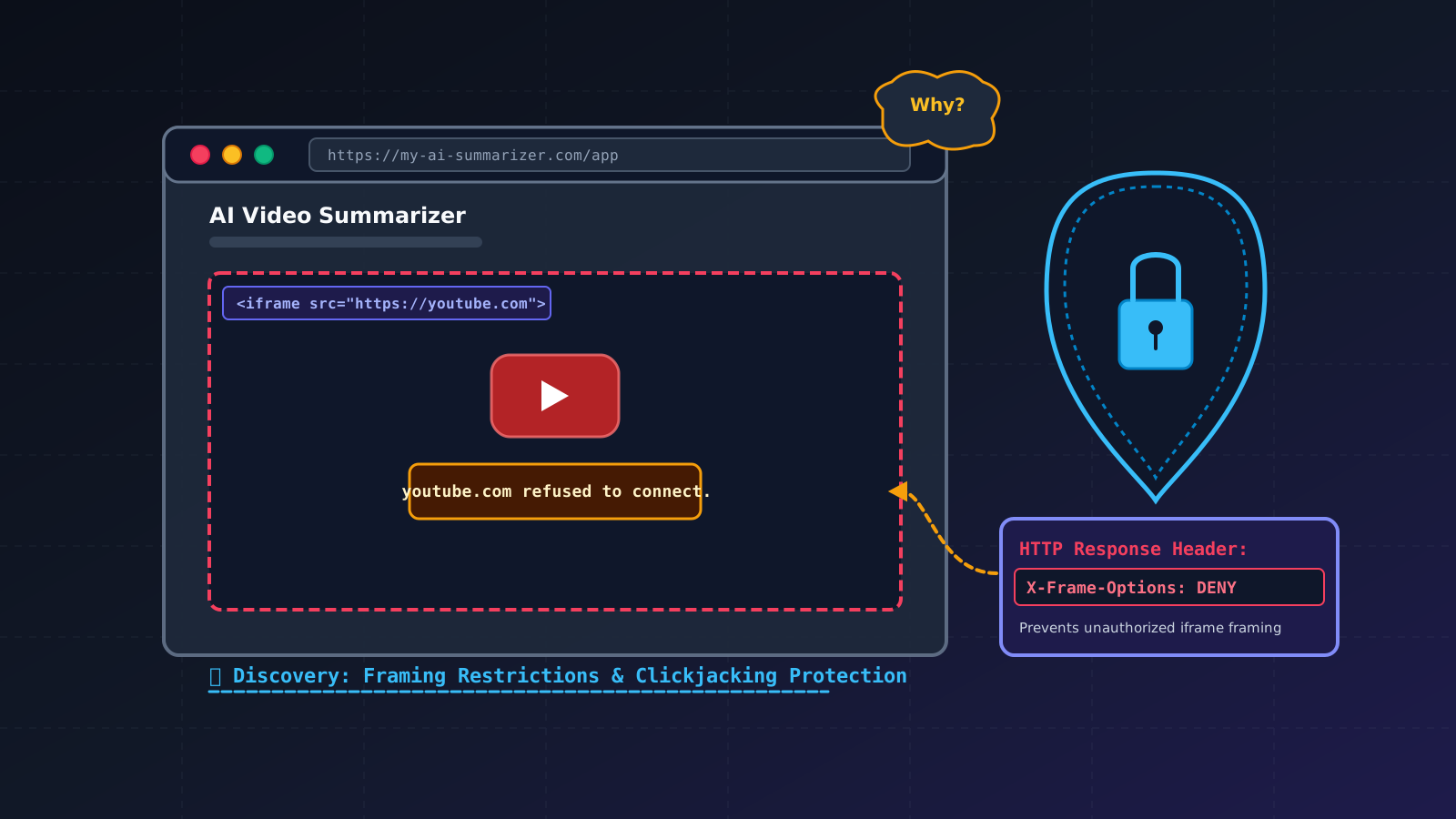
I was building an AI Video Summarizer.
The idea was simple:
Give the application a YouTube video, and it generates a summary.
While building it, I started thinking about the user experience.
If someone wants to summarize a YouTube video, they currently have to leave my application, open YouTube, find the video, copy the link, come back, paste it, and then start the summarization process.
And I thought:
Why should the user have to leave my application just to find a YouTube video?
Then I had an idea.
What if I put YouTube directly inside my application?
Not a YouTube link.
Not a redirect.
I mean YouTube.com itself.
The user could open YouTube inside my application, search for a video, find something interesting, and then continue with the summarizer without switching tabs.
Since browsers provide <iframe>, I thought this would be a pretty simple experiment.
So I tried it.
And it didn't work.
My Little Experiment
I created an iframe and pointed it directly at YouTube:
<iframe src="https://www.youtube.com"></iframe>
I expected something like:
+--------------------------------------+
|                                      |
|              YouTube                 |
|                                      |
|       Search → Browse → Watch        |
|                                      |
+--------------------------------------+
Instead, I got:
youtube.com refused to connect
My first thought was:
What did I break?
I checked my code.
The iframe was there.
The URL was correct.
The browser was working.
So why wouldn't YouTube load?
Instead of immediately looking for a workaround, I started asking:
Why doesn't YouTube allow this?
That question took me somewhere I wasn't expecting.
An iframe Is Not Just a Window
When I first learned about iframes, I mostly thought of them as a simple way to put another webpage inside my own page.
Something like:
<iframe src="https://example.com"></iframe>
Simple.
But the web can't allow this without restrictions.
Imagine if any website could freely embed any other website.
A malicious website could potentially load a trusted website inside an iframe and manipulate how the user interacts with it.
And that's where I came across a security concept called:
Clickjacking
Clickjacking is a type of attack where a user is tricked into clicking on something different from what they think they're clicking.
The important part is deception.
The user sees one interface.
But their interaction is actually reaching another interface.
For example, imagine a malicious website showing:
+--------------------------------+
|                                |
|        🎁 YOU WON!             |
|                                |
|       [ CLAIM NOW ]            |
|                                |
+--------------------------------+
The user thinks they're clicking:
CLAIM NOW
But an attacker could potentially position a framed website underneath or over the visible interface in a way that causes the click to land on a different control.
Conceptually:
What the user sees:

        [ CLAIM NOW ]


What receives the click:

        [ SENSITIVE ACTION ]
The user believes they are performing one action.
The browser may actually be processing another.
That's the basic idea behind clickjacking.
Why Is Clickjacking Dangerous?
The attacker doesn't necessarily need to steal your password.
They may simply want you to perform an action that you didn't intend to perform.
Depending on the application, that could involve things like:
- Changing an account setting
- Submitting a form
- Authorizing an action
- Clicking a sensitive button
- Changing preferences
The attack relies on making the user believe they are interacting with one thing while they are actually interacting with something else.
And that's why unrestricted framing can become a security problem.
So How Do Websites Protect Themselves?
This is where the iframe problem became more interesting to me.
Websites can tell browsers whether their pages are allowed to be displayed inside frames.
One mechanism is the X-Frame-Options response header.
For example:
X-Frame-Options: DENY
This tells the browser that the page should not be displayed inside a frame.
Another option is:
X-Frame-Options: SAMEORIGIN
which restricts framing to pages from the same origin.
There is also a more flexible modern mechanism using Content Security Policy:
Content-Security-Policy: frame-ancestors 'self';
This lets a website specify which origins are allowed to embed its pages.
So when a website doesn't appear inside an iframe, it isn't necessarily because the developer writing the iframe made a mistake.
Sometimes the website is intentionally telling the browser not to allow it.
Was YouTube Blocking Me Because of Clickjacking?
This is where I had to be careful with my own conclusion.
Not exactly.
My original problem was simply that I tried to load YouTube.com inside an iframe and it refused to connect.
That doesn't mean:
"YouTube blocked my iframe because of clickjacking."
That's too simplistic.
What actually happened was:
I tried to embed YouTube → I encountered framing restrictions → I started investigating how websites control framing → that led me to clickjacking.
Clickjacking was the security concept I discovered while following the rabbit hole, not necessarily the direct reason for the specific YouTube error.
And I think that distinction matters.
One Small Product Idea Led to a Security Lesson
The entire chain started with a product problem.
I was building an AI Video Summarizer.
I wanted to make it easier for users to find videos.
So I thought:
Why make users leave my application?
Then:
What if I put YouTube inside my application?
Then:
Why doesn't the iframe work?
Then:
How do websites control who can frame them?
Then:
What happens if framing is abused?
And finally:
What is clickjacking?
That's the part of building software that I really enjoy.
Sometimes you don't learn something because you planned to study it.
You learn it because something broke and you were curious enough to ask why.
What I Learned
Before this, I mostly thought about an iframe as:
<iframe>
A simple HTML element for displaying another page.
Now I see it as part of a much bigger system.
Behind that tiny element are questions about:
- Origins
- Browser security
- Framing policies
- User interaction
- Trust boundaries
- Content Security Policy
- Clickjacking
And that's one of the things I love about web development.
A feature that looks extremely simple on the surface can have an entire security model underneath it.
The Bigger Lesson
I could have stopped after finding a solution to my original problem.
I could have simply said:
"YouTube can't be embedded this way."
And moved on.
But then I would have learned what happened, not why.
That difference matters.
When I'm building projects now, I'm trying to develop the habit of asking one more question whenever something unexpected happens:
Why?
Why did the browser do this?
Why does the server return this header?
Why is this page allowed to load here?
Why isn't it?
Those questions often lead somewhere much more interesting than the original bug.
In my case, it led from:
AI Video Summarizer → YouTube → iframe → framing restrictions → browser security → clickjacking.
All because I wanted to make one small improvement to my application's user experience.
Final Thought
This is probably one of my favorite things about building projects.
You start with a feature.
You encounter a problem.
You investigate the problem.
And somewhere along the way, you learn something you weren't even planning to learn.
I started by asking:
"Can I put YouTube inside my AI Video Summarizer?"
I ended up learning:
"Why does the web care so much about who is allowed to frame whom?"
And that's a much more valuable lesson than simply making the iframe work.
**Sometimes a bug isn't just something you need to fix.
Sometimes it's an invitation to understand the web a little better.**