I Built an AI Video Summarizer. Then YouTube Bot Detection Broke It
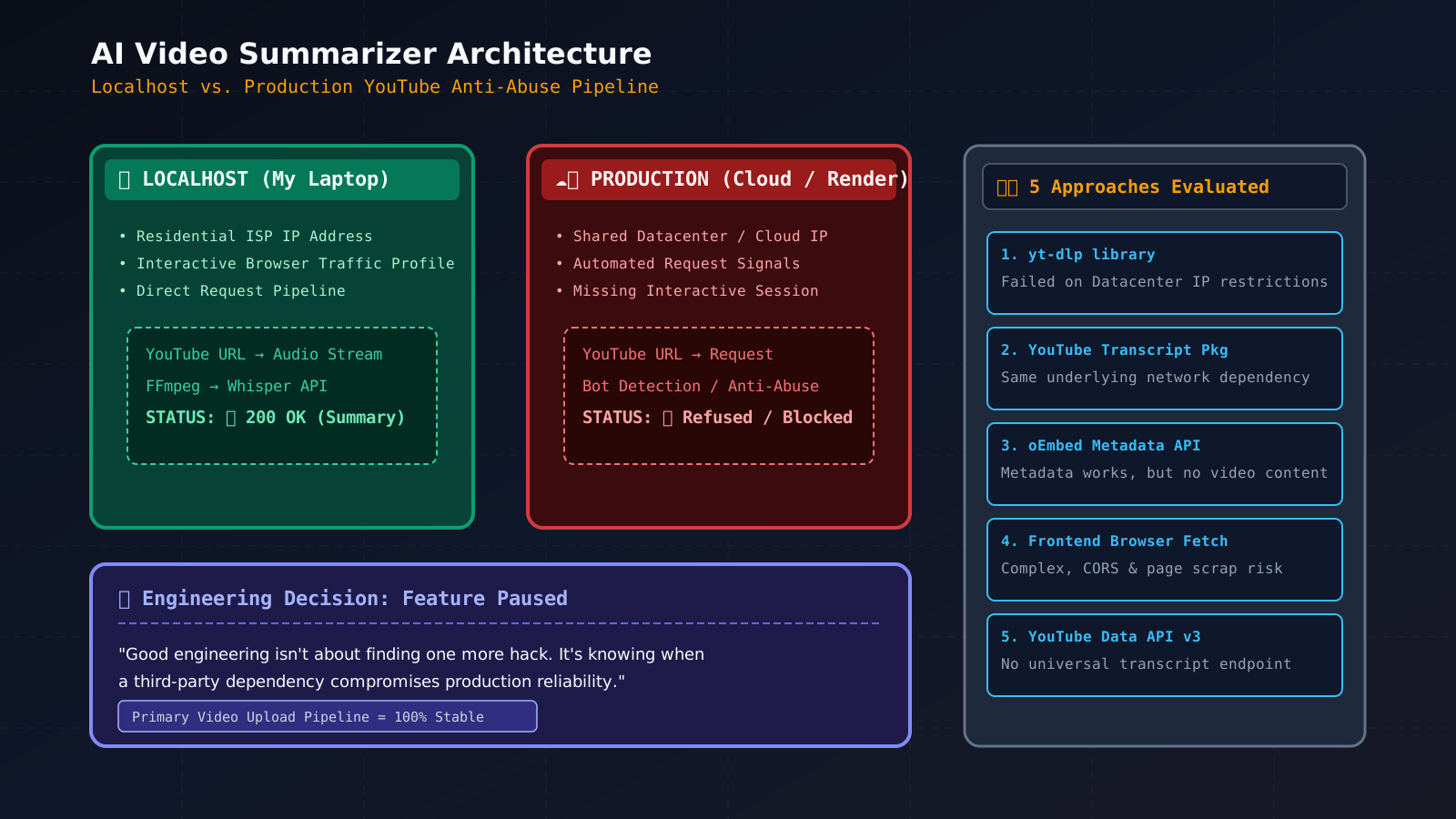
Building something on localhost can give you a dangerous feeling of confidence.
Everything works.
The APIs respond.
The pipeline is complete.
You deploy it.
And suddenly, the feature that worked perfectly on your laptop refuses to work in production.
That is exactly what happened when I added YouTube support to my AI Video Summarizer.
This isn't a tutorial about how to bypass YouTube's protections.
It is a story about what I built, what broke after deployment, the approaches I tried, what I learned about bot detection, and why I eventually decided to put the YouTube feature on hold.
What I Was Building
I built an AI-powered video summarization website.
The idea is simple:
Upload a video → extract the audio → convert it into text → summarize it using AI.
The user shouldn't have to watch an hour-long video just to understand its key points.
The application does the heavy lifting.
My initial pipeline looked like this:
User uploads video
        ↓
      FFmpeg
        ↓
  Extract audio
        ↓
   Whisper API
        ↓
    Transcript
        ↓
      AI API
        ↓
     Summary
The first version worked.
So naturally, I wanted to make it more useful.
And the most obvious next feature was:
Why not allow users to paste a YouTube URL?
Adding YouTube Support
The experience I wanted was extremely simple.
The user pastes:
https://www.youtube.com/watch?v=VIDEO_ID
and my application handles the rest.
The expected pipeline was:
YouTube URL
     ↓
Extract/download audio
     ↓
     FFmpeg
     ↓
   Whisper
     ↓
  Transcript
     ↓
      AI
     ↓
   Summary
I implemented it.
And on localhost...
It worked.
That sentence would later become the beginning of my problem.
The Problem: It Worked Locally but Failed in Production
After deploying the backend, the YouTube feature stopped working.
The failure wasn't happening in FFmpeg.
It wasn't happening in Whisper.
It wasn't happening in the AI summarization API.
It was happening before all of them.
My production server was unable to reliably retrieve the YouTube content required for the next step.
The pipeline had effectively become:
YouTube URL
     ↓
❌ Cannot reliably retrieve content
     ↓
No audio
     ↓
Whisper never runs
     ↓
No transcript
     ↓
No summary
At first, I thought:
"Maybe my YouTube downloader is broken."
But then I started digging deeper.
And I realized that the real problem was much more interesting.
Why Does Localhost Work While Production Fails?
This was probably my biggest lesson from the entire project.
From my application's perspective, these two environments were doing the same thing:
downloadYouTubeVideo(url)
But from the perspective of the external service, they were completely different clients.
My local environment looked roughly like:
My Laptop
   ↓
Home/ISP Network
   ↓
Internet
   ↓
YouTube
Production looked more like:
Production Server
   ↓
Cloud / Datacenter Network
   ↓
Internet
   ↓
YouTube
That difference matters.
A production server can have:
- A datacenter IP
- Shared infrastructure
- Different network reputation
- Automated request patterns
- No normal browser session
- Different cookies/session state
- Different request characteristics
So the problem wasn't necessarily:
"My code works locally but is broken in production."
It could instead be:
"The external service treats my production environment differently."
And that's where bot detection entered the picture.
What Does YouTube Bot Detection Actually Mean?
When I say "YouTube bot detection," I don't mean that there is one simple check like:
if User-Agent == bot:
    block()
The exact detection mechanisms used by YouTube aren't publicly exposed in full, so I can't claim to know exactly which signal caused my particular request to fail.
But conceptually, modern anti-abuse systems can evaluate multiple signals together.
Think about the request like this:
                    Request
                       │
                       ▼
                YouTube systems
                       │
              ┌────────┼────────┐
              │        │        │
              ▼        ▼        ▼
            Network  Request   Session
            signals  behavior  context
              │        │        │
              └────────┼────────┘
                       ▼
                 Risk assessment
                       │
                ┌──────┴──────┐
                │             │
             Allowed       Restricted
The important idea is:
Bot detection is generally a collection of signals, not a single switch.
1. IP Address and Network Reputation
One of the biggest differences between localhost and production is the IP address.
My laptop uses a normal ISP connection.
A production backend may use a cloud/datacenter IP.
That doesn't mean:
Datacenter IP = bot.
Cloud infrastructure is used by millions of legitimate applications.
But the network environment can still be one of many signals an anti-abuse system considers.
This is why the following can happen:
Same code
Same URL
Same library

Laptop       → Works
Cloud server → Fails
The code didn't necessarily change.
The network environment did.
2. Request Patterns
Humans and backend programs behave differently.
A human might:
Open YouTube
      ↓
Search
      ↓
Open video
      ↓
Wait
      ↓
Watch
      ↓
Interact
An automated backend might do:
Receive URL
      ↓
Request video information
      ↓
Request media
      ↓
Download
      ↓
Process
      ↓
Repeat
Again, neither pattern alone proves anything.
But automated traffic can have characteristics that are different from normal interactive usage.
This becomes even more important when your application becomes public.
Instead of one person requesting one video, your server might be handling:
User A ─┐
User B ─┤
User C ─┼──→ Your Backend ──→ YouTube
User D ─┤
User E ─┘
Now a single backend infrastructure may generate requests for many users.
That's an architectural problem, not simply a programming problem.
3. Cookies and Session Context
A normal browser session has context.
For example:
Browser
   ↓
Cookies
   ↓
Session state
   ↓
Other browser state
   ↓
YouTube requests
A backend downloader may simply make programmatic requests without the same browser session context.
That doesn't mean:
"No cookies = blocked."
It means the request can look very different from a normal user session.
And when you're dealing with an anti-abuse system, differences like this can matter.
4. Headers and Client Characteristics
HTTP requests contain information about how a client communicates.
Things such as:
User-Agent
Accept
Accept-Language
Cookie
Referer
can contribute to the overall request profile.
A normal browser has a particular combination of headers and behavior.
A simple HTTP client can look very different.
This is why changing only:
User-Agent
is not necessarily a complete solution.
Modern systems don't have to rely on one header.
They can consider many signals together.
5. Browser Characteristics
When a real browser is involved, websites can potentially observe additional client characteristics through normal web functionality.
These can include things related to:
- Browser capabilities
- JavaScript execution
- Storage
- Timing
- Rendering
- Session behavior
- Network behavior
So even using a browser automation framework doesn't automatically mean:
"Now the website will treat me exactly like a human."
Automation can still behave differently from a normal interactive browser session.
6. Request Volume and Frequency
Imagine one user manually opening three videos.
Now imagine a public application processing hundreds of videos.
The traffic pattern is completely different.
Conceptually:
Normal user:

Video → wait → video → wait → video
versus:
Automated service:

Video → Video → Video → Video → Video
Again, this isn't proof of malicious activity.
But volume and frequency are natural things for anti-abuse systems to monitor.
This is one reason why something can work during development and become unreliable after being deployed as a public service.
The Five Approaches I Tried
Once I understood that the problem was happening around YouTube access, I started looking for alternatives.
I tried five different approaches.
Attempt 1 — yt-dlp
The first approach was yt-dlp.
It was the obvious choice for my original architecture.
The pipeline was:
YouTube URL
     ↓
yt-dlp
     ↓
Audio
     ↓
Whisper
     ↓
Transcript
Locally, it worked.
In production, I ran into the YouTube access/bot-detection problem.
The important lesson here was:
yt-dlpis a tool for interacting with YouTube. It isn't a guarantee that every production environment will be allowed to retrieve every video.
So replacing one downloader library with another doesn't necessarily solve an underlying platform-access restriction.
Attempt 2 — YouTube Transcript Package
Then I thought:
"Why download the video at all?"
If a video already has captions, maybe I could retrieve the transcript directly.
That would make the architecture much simpler:
YouTube
   ↓
Transcript
   ↓
AI
   ↓
Summary
This was conceptually much better.
But I still had the same fundamental dependency:
My application needed reliable access to YouTube's data.
So I had changed the data I wanted, but I hadn't completely removed the infrastructure problem.
Attempt 3 — oEmbed API
Next, I looked at YouTube's oEmbed API.
This can be useful for obtaining information about a video, such as metadata.
But then I realized something important:
Video metadata isn't video content.
Knowing:
Title
Channel
Thumbnail
Embed information
doesn't give me:
What was actually said in the video?
So oEmbed wasn't enough for an AI summarization pipeline.
The architecture became:
YouTube URL
      ↓
    oEmbed
      ↓
   Metadata
      ↓
❌ No transcript
Useful API?
Yes.
Solution to my problem?
No.
Attempt 4 — Getting the Text From the Frontend
Then I started thinking about moving part of the data acquisition process into the user's browser.
The idea was roughly:
User's browser
      ↓
YouTube
      ↓
Available text/transcript
      ↓
My backend
      ↓
AI
      ↓
Summary
This changes the architecture considerably.
Instead of asking my server to retrieve everything from YouTube, the browser becomes involved.
It sounded promising.
But now I had another set of engineering problems:
- Browser restrictions
- Access to transcript data
- Different YouTube page behavior
- Reliability
- Security
- Maintenance
- User interaction
I was slowly discovering that a seemingly simple feature was turning into an entire data-acquisition system.
Attempt 5 — YouTube Data API v3
Finally, I tried the official route.
If I'm working with YouTube, why not use Google's official API?
This was useful for understanding what YouTube officially exposes.
The Data API provides access to many types of YouTube resources and metadata.
It also has a Captions resource.
But it wasn't the simple universal API I was hoping for:
Give me any public YouTube URL
        ↓
Give me its complete transcript
That isn't how I could simply solve my use case with the API.
So again, I could access information about videos, but I didn't have the straightforward transcript pipeline I needed for arbitrary videos.
What I Finally Understood
After trying all five approaches, I realized I was looking at the problem incorrectly.
Initially, I was asking:
"Which package can download a YouTube video?"
Then:
"Which package can give me the transcript?"
Then:
"Which API can give me the information?"
Eventually, I started asking a better question:
"What part of my architecture depends on YouTube allowing my application to access this content?"
That changed everything.
My original pipeline looked simple:
YouTube
   ↓
Download
   ↓
FFmpeg
   ↓
Whisper
   ↓
AI
But the real dependency was:
             YouTube
                │
                ▼
       Can my environment
       reliably access it?
                │
         ┌──────┴──────┐
         │             │
       Local        Production
         │             │
         ▼             ▼
       Works         Fails
         │
         ▼
       FFmpeg
         │
         ▼
      Whisper
         │
         ▼
         AI
The AI wasn't the difficult part.
The difficult part was getting reliable access to the source material.
Why Changing Libraries Didn't Solve It
This was probably the most important technical lesson.
I tried:
yt-dlp
YouTube transcript package
oEmbed
Frontend extraction
YouTube Data API
Five different approaches.
But several of them still depended on the same external platform.
So:
Library A
    ↓
YouTube
becoming:
Library B
    ↓
YouTube
doesn't necessarily change:
Production server
       ↓
Network
       ↓
YouTube
If the underlying restriction is at the platform or network level, changing libraries won't magically remove it.
Could Moving From Render to EC2 Solve It?
This is something I also started thinking about.
My backend was deployed on Render.
So naturally, I asked:
"Is Render causing the problem?"
Possibly.
But I wouldn't conclude that immediately.
Moving from:
Render
to:
EC2
or:
DigitalOcean
changes the infrastructure and outbound network environment.
It doesn't guarantee that YouTube will allow the requests.
You could potentially get:
Render → ❌
EC2 → ✅
But you could also get:
Render → ❌
EC2 → ❌
DigitalOcean → ❌
because all of these are still cloud/datacenter environments.
So instead of blindly migrating my entire application, I would test the exact same operation from different environments first.
The experiment is simple:
Laptop
   ↓
yt-dlp
   ↓
 ?

Render
   ↓
yt-dlp
   ↓
 ?

EC2
   ↓
yt-dlp
   ↓
 ?
If only Render fails, infrastructure migration might make sense.
If every datacenter environment fails while the laptop works, then moving providers isn't really addressing the fundamental issue.
That was another lesson:
Don't change your infrastructure before you understand which variable is actually causing the failure.
Why I Eventually Put YouTube Support on Hold
At this point I had two choices.
Keep fighting YouTube
I could keep trying:
- More libraries
- More extraction methods
- More infrastructure
- More browser automation
- More complicated workarounds
Or I could do something much simpler.
Put the feature on hold
I chose the second option.
Not because YouTube summarization is impossible.
But because I didn't want to ship a feature that:
Works on my laptop
        ↓
Sometimes works in production
        ↓
Breaks when YouTube changes something
A production feature needs more than a successful demo.
It needs to be:
- Reliable
- Maintainable
- Predictable
- Operable
- Appropriate for the environment
My YouTube implementation wasn't there yet.
So I paused it.
The Architecture I Can Trust Right Now
The original video-upload workflow remains reliable:
User uploads video
        ↓
      FFmpeg
        ↓
   Extract audio
        ↓
    Whisper API
        ↓
    Transcript
        ↓
      AI API
        ↓
      Summary
And honestly, that's okay.
The project doesn't need every possible input format on day one.
I'd rather have one reliable pipeline than two pipelines where one works only under certain conditions.
What This Project Taught Me About Production
This experience changed how I think about building software.
1. Localhost Is Not Production
A feature working locally proves that your code can work under one environment.
It doesn't prove that the entire system will work in production.
Production introduces:
- Different networking
- Different IP reputation
- Different infrastructure
- Different traffic patterns
- Different permissions
- Different external-service behavior
2. Debug the Pipeline, Not Just the Code
My application had several layers:
YouTube
 ↓
Downloader
 ↓
FFmpeg
 ↓
Whisper
 ↓
AI
When the final result was missing, I could have started debugging the AI.
But the AI wasn't the problem.
The failure happened much earlier.
This is why one of the most important debugging questions is:
Where exactly did the pipeline fail?
3. Third-Party Platforms Are Part of Your Architecture
When you build on top of another platform, you're not just depending on an API.
You're depending on its:
- Availability
- Policies
- Access controls
- APIs
- Infrastructure
- Rate limits
- Authentication
- Future changes
That platform becomes part of your system whether you like it or not.
4. A Five-Line Feature Can Hide a Huge Engineering Problem
From the user's perspective:
Paste YouTube URL
That's it.
But behind that button can be:
Content acquisition
        +
Network access
        +
Third-party restrictions
        +
Transcription
        +
Processing
        +
AI summarization
The UI can be tiny.
The infrastructure problem can be enormous.
The Bigger Lesson
When I started this project, I thought I was primarily building an AI application.
But the AI part turned out to be one of the easier pieces.
The difficult questions were around the edges:
How do I get the data?
Can I access it reliably?
Does the production environment behave differently from localhost?
What happens when a third-party platform changes its behavior?
Is this dependency reliable enough to build a product around?
These are the problems that aren't always visible in tutorials.
And sometimes, they are the problems that teach you the most.
Final Takeaway
If you're a developer and you encounter:
"It works on localhost but YouTube blocks it after deployment."
Don't immediately assume that your FFmpeg, Whisper API, AI API, or application logic is broken.
Break the pipeline down:
Can I access the source?
        ↓
Can I obtain the required content?
        ↓
Can I process it?
        ↓
Can I transcribe it?
        ↓
Can I summarize it?
Find the first point of failure.
For me, that point was getting reliable access to YouTube content from my production environment.
I tried five different approaches.
I learned about the difference between local and production environments.
I learned how external platforms can become architectural dependencies.
And eventually, I made a decision that I think is just as important as writing code:
I put the YouTube feature on hold.
Because sometimes good engineering isn't about finding one more workaround.
Sometimes it's knowing when a feature isn't ready to be shipped.
And that lesson was probably more valuable than the feature itself.